


You ran your video through AI dubbing. The result was… fine. The pacing felt off in a few spots, one product name sounded wrong, and the emotional moment in your intro landed flat.
If you’re a creator publishing content in multiple languages, you’ve probably hit this wall. The dub exists — but it’s just not quite right.
This post covers the AI dubbing best practices that actually move results — a phase-by-phase workflow, before and after the AI runs, so your dubbed videos sound the way you intended. AI dubbing handles the heavy lifting — but for some languages, accents, or jargon-heavy content, you’ll still need a few manual adjustments to get the tone exactly right. This workflow shows you exactly where to focus that effort.
1. Prep your source material before you run AI dubbing — clean audio and a reviewed transcript are non-negotiable.
2. After generation, focus your review on three things: translation accuracy, pronunciation, and pacing.
3. Use sentence-level editing to fix only what’s broken — you don’t need to redo the whole video.
Sixty-one percent of video bloggers are now using AI dubbing to reach multilingual audiences — according to Zebracat’s 2025 data. The tool isn’t the hard part. What trips creators is a consistent set of failure modes that show up regardless of which platform you use.
These aren’t random glitches — they’re predictable failure modes that show up in nearly every AI-generated dub. Research on AI dubbing limitations points to the same weak spots across platforms:
Literal translation. AI translates what you said, not what you meant. Idioms, humor, and CTAs frequently break. A phrase like “let’s dive in” can become a bizarre instruction to swim in the target language.
Pronunciation of proper nouns. Brand names, product names, personal names — AI guesses phonetically, and it often guesses wrong. If your channel name or signature product sounds different in every dubbed language, audiences notice.
Flat emotional delivery. AI doesn’t know your intro hook is the emotional peak of your video. It treats all sentences equally. The moment you crafted to create a connection can come out like a weather report.
Sound familiar? Knowing these patterns are coming puts you ahead of most creators. The rest of this guide shows you exactly what to do about each one.
Phase 1 — Choosing the Right Source for Seamless Results
While some platforms provide tools to review and edit your transcript before you generate, those changes are often final, and you might not have the same flexibility once the audio is created. Gooddub is built for speed and iteration. We believe in hitting "Generate" first and giving you the power to refine as much as you want after you’ve heard the results.
To help the AI give you the best possible first draft, it’s helpful to know which types of source audio currently yield the smoothest results:
In short: We share these insights to help set your expectations and ensure you get the best results—but don't let them hold you back. The best rule of thumb is to always give it a try. Even if your source isn't 'studio-perfect,' it's worth hitting generate to see what the AI can do. Our post-generation editor is always there to bridge the gap and handle the fine-tuning whenever you’re ready.
Most creators open their dub and start listening immediately. That’s the wrong order.
Check translation first, audio second. Read the translated script before you listen to a single word. Does it actually say what you meant? Literal translations can kill engagement — especially for humor, idioms, and CTAs. If the words are wrong, fixing the audio on top of them is wasted effort.
Spot-check your emotional peaks. Your intro hook, key story moment, and CTA are the highest-risk segments for flat AI delivery. Once you’ve confirmed the translation is solid, listen to these segments first. They’re the ones that move your audience — or don’t.
Flag, don’t fix yet. Do a full pass before you re-record anything. Mark every segment that needs attention. When you see the full pattern across the video, you’ll prioritize better — and you’ll often find that three sentences account for most of the problem.
This sequence — translation before audio, flag before fix — is a step most creators skip. Listening first feels natural. But if the translation is off, no amount of audio polish will fix it.
You’ve flagged your problem segments. Now you fix them — one sentence at a time, not the whole video.
Fix pronunciation. For proper nouns, brand names, or technical terms the AI mispronounced, use a phonetic hint or retranslate the individual segment. One targeted fix, not a full regeneration.
Fix pacing. Short sentences with heavy punch that come out rushed — regenerate that segment with adjusted timing, or split it into two shorter segments. Rushed delivery on a key statistic loses the audience before the point lands.
Fix flat emotional moments. For intros or personal story segments, consider a speech-to-speech re-record with more energy — just on that segment. You’re not rebuilding the video; you’re lifting the two or three moments that carry the most weight.
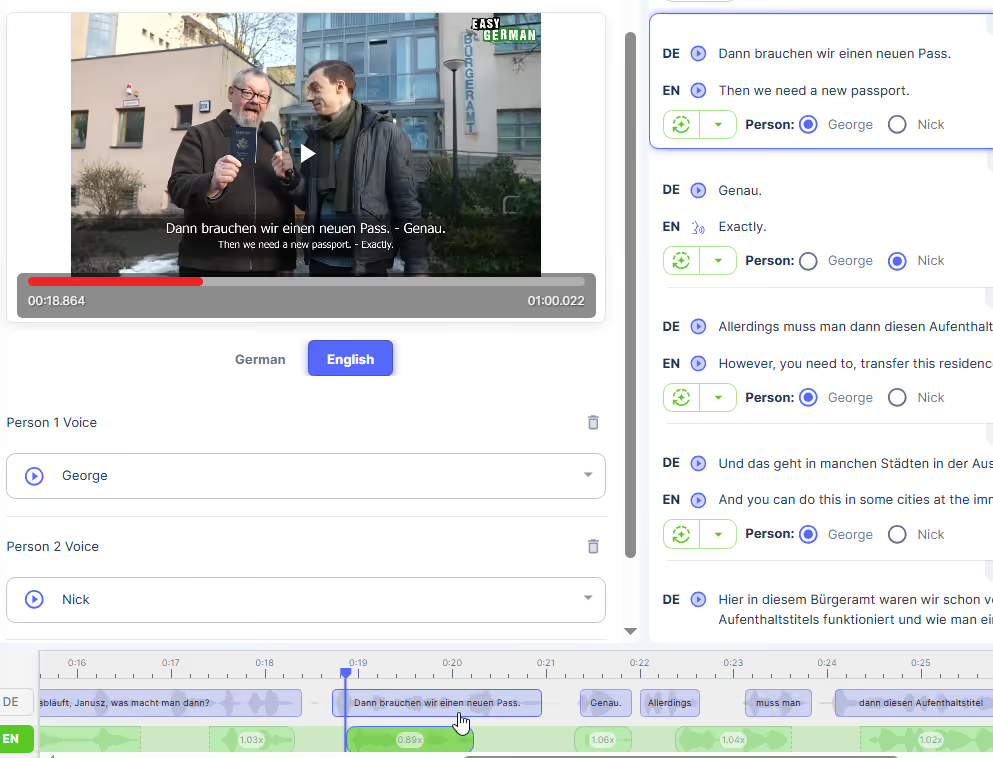
In GoodDub, after the AI generates your dub, every sentence is its own editable segment. Click into any segment to retranslate, re-record with speech-to-speech, or adjust timing — without touching anything else. This means you’re not redoing the whole video. You’re fixing the three sentences that actually need it.
Most QC failures in AI-dubbed content are invisible until after you’ve published. This checklist covers the errors that come up repeatedly across AI dubbing tools. Run it before you hit publish — it takes under five minutes and catches the issues your audience will notice before you do.
Pre-publish QC checklist:
☐ Brand/product names pronounced correctly
☐ Numbers, percentages, dates — verified in target language
☐ Pacing feels natural throughout (not rushed, not slow)
☐ Emotional high points — intro, CTA, key story moment — sound engaged, not flat
☐ No untranslated words or code-switching errors
☐ Audio volume is consistent (no sudden drops or spikes)
☐ Translation passes a “would a native speaker say this?” check
Not every item needs to be fully resolved. If six pass and two are acceptable, publish. Don’t let the pursuit of a flawless result keep a good video from going out.
Not all content responds to AI dubbing the same way—and getting this wrong is one of the most expensive mistakes a creator can make. While AI handles tutorials, explainers, and data walkthroughs reliably, some moments carry weight that a standard text-to-speech engine might "flatten."
Research on AI versus human voice trade-offs consistently points in the same direction: use AI for the bulk of informational content, and bring in human polish for moments where trust or emotion is on the line. The combination outperforms either approach on its own. These "personality-first" moments include:
In the past, you’d have to hire a voice actor to fix these moments. GoodDub gives you a much faster, hybrid workflow right inside the sentence-level editor:
The math still heavily favors this hybrid model. Traditional professional dubbing averages $500–$2,000 per minute, whereas high-quality AI dubbing typically runs under $200 per minute.
By using AI for 90% of your video and using GoodDub’s STS for those high-impact "human" moments, you achieve studio-quality results at a fraction of the cost. You don’t need to outsource to a studio; you just need the right tools to guide the AI toward perfection.
AI dubbing vs human dubbing — when to use which
The creators who get the best AI dubbing results treat generation as the start, not the end. A consistent prep-to-QC workflow is what separates “usable” from “great.”
GoodDub makes the AI draft sentence-level controllable — so you raise quality through process, not by chance.
Try GoodDub free and see how sentence-level editing changes what’s possible with AI dubbing.


